- Home
- Tuition and Fees
- Cost of Attendance
- Online Programs
- Instructions for Completing Enrollment
- Self-Service Banner
- Accessing 1098T Information
- E-Books
- Cafe Cash
- Payment Plans
- Tuition/Fee Exemptions and Waivers
- Refund Policy/Information
- Tuition and Fee Adjustments
- Non-Refundable Fees
- How to View Student Account Holds & Details
- Outstanding Balances
- Policies
- FAQ'S
- Comptroller's Office
Bursar's Office | How to View Student Account Holds & Details
At Southern University at New Orleans, students can easily view, manage, and pay their student account balances and any hold charges through our online Self-Service Banner portal. The system allows students to track current term charges in real time and conveniently submit payments from any device.
Log on to the Southern University at New Orleans website:
1. From the home page of SUNO's website, click “Students”

2. Click on to Banner 9.

3. Navigate over to "Banner"

4. Click onto "Banner 9 Self Service Registration"

5. Click on "Student"

6. Click on "Student Account Summary"

7. Click on the drop down tab and go to "View By Term"

8. For "Student Holds" click on the "Holds" tab next to "Pay Now"
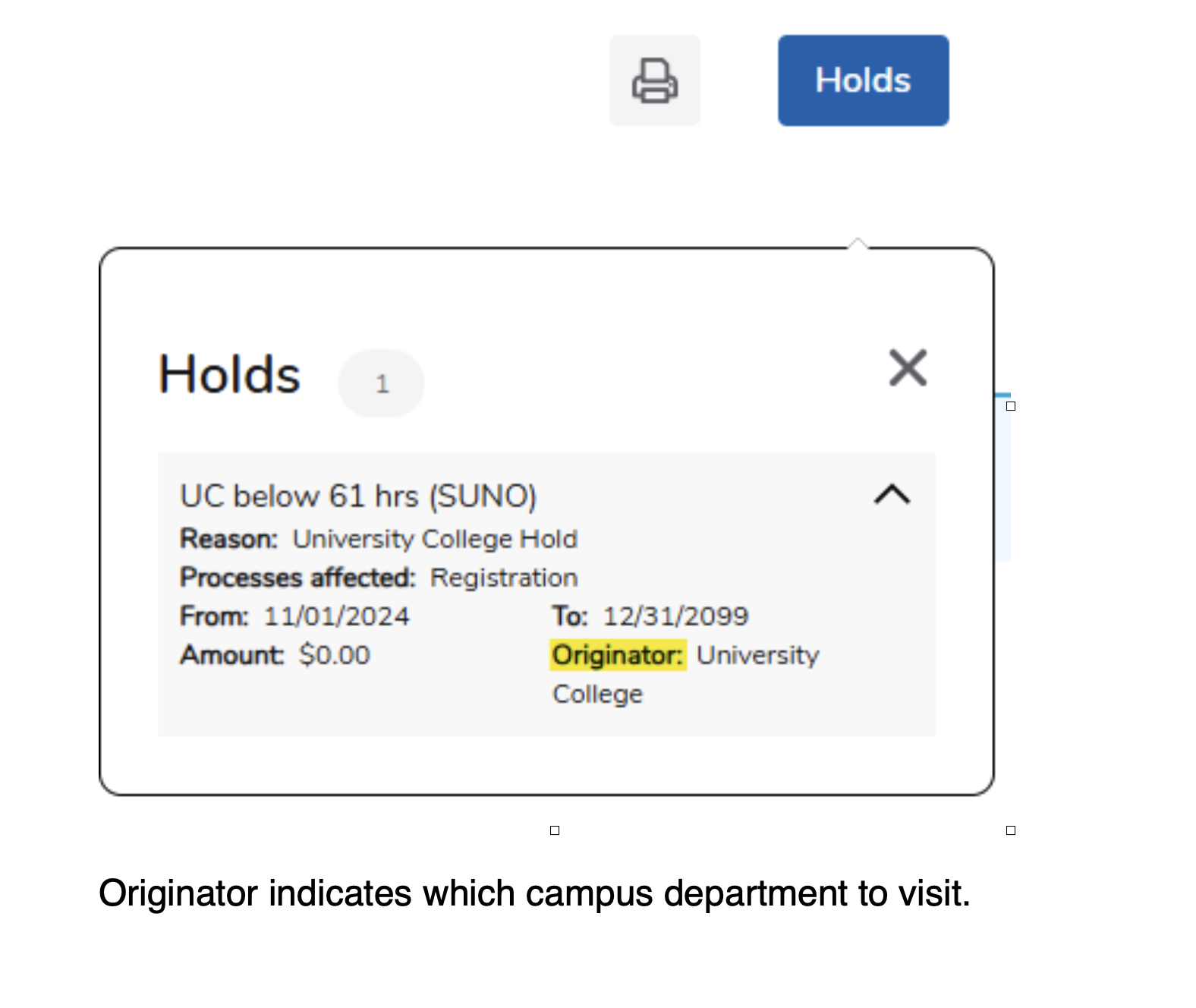
9. Example of Student Details